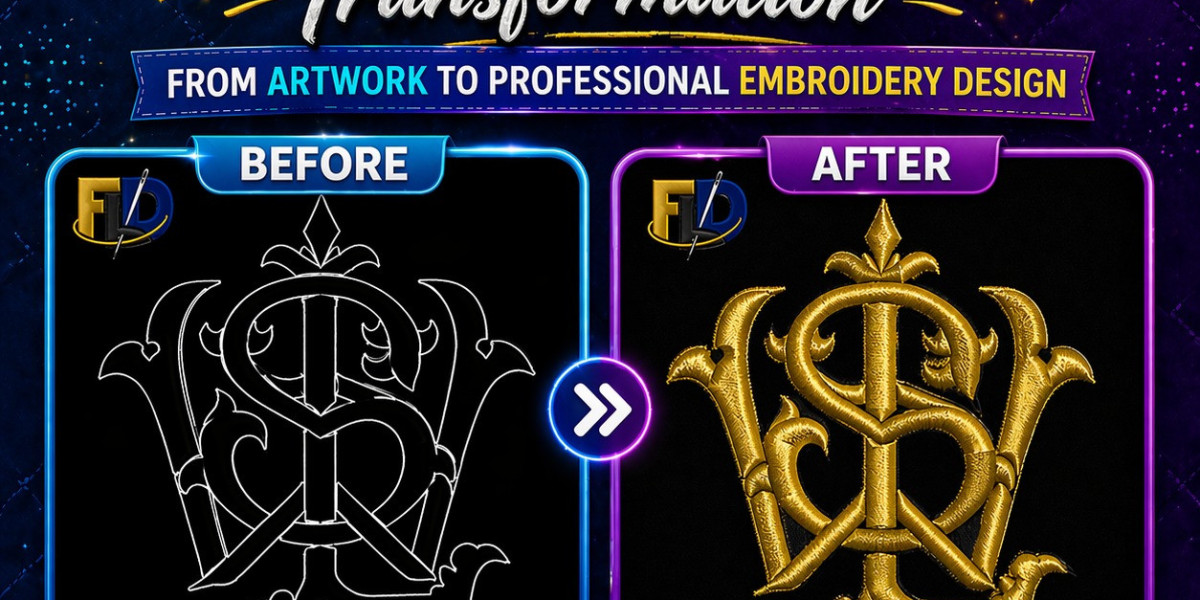

A clean embroidered logo can make a business look polished and professional. However, before a machine can stitch a design on a cap, jacket, or polo shirt, the artwork must go through logo digitizing for embroidery. This process converts a normal image into a stitch file that embroidery machines can read. In the USA embroidery market, businesses rely on logo digitizing for embroidery to create sharp and consistent branding on apparel.
Many people think embroidery machines simply “print” logos onto fabric. That would be nice, but embroidery machines are a bit pickier than that. They need detailed stitch instructions. That is where digitizing comes in. A good digitized file helps the machine stitch smoothly, reduces thread breaks, and keeps the logo looking neat.
Whether you own a clothing brand, run an embroidery shop, or want uniforms for your staff, understanding the digitizing process can save time, money, and frustration.
Understand How Logo Digitizing for Embroidery Works
The process starts with artwork. Usually, a customer sends a PNG, JPG, PDF, AI, or EPS file. After that, a digitizer converts the image into embroidery stitches using special software.
During logo digitizing for embroidery, the digitizer decides:
- Stitch type
- Stitch direction
- Density
- Underlay
- Thread sequence
- Pull compensation
These settings help the embroidery machine stitch the design properly on fabric.
For example, a simple text logo on a polo shirt needs different settings than a thick logo on a baseball cap. Therefore, experienced digitizers adjust files based on garment type and placement.
Why Embroidery Logo Conversion Is Important
A regular image file cannot run directly on an embroidery machine. That is why embroidery logo conversion matters so much. The machine needs commands, not just artwork.
Think of it like cooking from a recipe. A logo image is the food photo, while the digitized embroidery file is the actual recipe with step-by-step instructions.
Without proper conversion, logos may stitch poorly. Letters can sink into fabric, circles may become uneven, and thread breaks can happen constantly. Nobody wants a company logo that looks like it survived a wrestling match with the embroidery machine.
Choose the Right Artwork Before Digitizing
Clean artwork always produces better embroidery results. High-quality vector files usually work best because they maintain sharp edges.
If the logo image is blurry, the digitizer may need to redraw parts of it before starting the file setup. In many cases, simple logos digitize faster and stitch better than overly detailed designs.
Additionally, color separation helps the process move smoothly. When colors overlap too much, thread trims and jump stitches increase.
A good logo to embroidery file setup starts with clear artwork and readable text.
Learn How Stitch Types Affect Embroidery Quality
Different stitch types create different textures and looks. Skilled digitizers choose stitches based on logo elements and fabric type.
Satin Stitches
Satin stitches work best for borders, text, and narrow shapes. They create a smooth and shiny appearance.
Fill Stitches
Fill stitches cover larger areas. These stitches work well for bold logos and background shapes.
Run Stitches
Run stitches are mainly used for outlines and fine details.
During logo stitch file creation, stitch direction also matters. Incorrect stitch angles can cause fabric pulling and uneven designs.
See Why File Formats Matter for Embroidery Machines
Different embroidery machines use different file formats. Therefore, digitizers often export files in multiple formats depending on the customer’s machine.
Some common formats include:
- DST
- PES
- EXP
- JEF
- VP3
Many commercial embroidery shops request DST files. That is why businesses often ask digitizers to convert logo to DST format.
DST files work with several industrial embroidery machines, including Tajima systems. Meanwhile, PES files are common for Brother embroidery machines.
Always confirm machine compatibility before production starts.
Use Special Settings for Caps and Hats
Caps are one of the hardest items to embroider. Flat logos behave differently on curved cap fronts. Because of that, digitizers apply special techniques when they digitize logo for cap embroidery.
Cap designs usually stitch from the center outward. This method reduces distortion and keeps registration aligned.
Foam embroidery and 3D puff logos also require special stitch settings. For example, the digitizer must increase satin stitch width and reduce unnecessary trims.
One embroidery shop owner in Texas shared that switching to proper cap digitizing reduced production issues by nearly half. Before that, their machine operator spent more time fixing thread breaks than actually stitching hats.
Know Why Testing Is Part of the Process
Even a well-designed embroidery file should go through a test sewout. Digitizers use test runs to check:
- Thread tension
- Fabric movement
- Stitch alignment
- Small text readability
- Color sequence
A file may look perfect on a computer screen but stitch differently on fabric. Therefore, testing helps catch issues early.
Professional shops rarely skip sewouts because fixing problems after bulk production costs much more.
Understand the Role of Company Branding
Brand consistency matters for businesses. A poorly stitched logo can affect how customers view a company.
That is why many businesses invest in company logo embroidery digitizing services. Clean embroidery creates a polished appearance on uniforms, jackets, and promotional apparel.
Restaurants, gyms, construction companies, and retail stores often use embroidered branding because it lasts longer than many print methods.
Additionally, embroidery adds texture and depth that printed logos sometimes lack.
Work With a Professional Logo Embroidery Punch Service
Not all digitizing services deliver the same quality. Some providers rely heavily on auto-digitizing tools, while others manually adjust stitch settings for better results.
A professional logo embroidery punch service understands how different fabrics behave during embroidery. They also know how to reduce puckering, gaps, and unnecessary trims.
When choosing a digitizing provider, check for:
- Sample sewouts
- Fast communication
- File revision support
- Machine compatibility
- Experience with caps and uniforms
Cheap digitizing may save money initially, but poor files often create production headaches later.
Avoid Common Digitizing Mistakes
Several mistakes can ruin embroidery quality. Fortunately, most are avoidable.
Using Low-Quality Artwork
Blurry logos lead to unclear stitch paths and messy embroidery.
Overly Small Text
Tiny lettering becomes unreadable if stitch density is too high.
Wrong Stitch Density
Too many stitches can cause thread breaks and stiff embroidery.
Ignoring Fabric Type
A design for fleece may not work well on thin polo shirts.
During business logo digitizing, professionals adjust settings based on fabric thickness and garment style.
Know What Makes a Digitized Logo Successful
A successful embroidery file should:
- Stitch cleanly
- Run smoothly on the machine
- Maintain shape after washing
- Reduce thread breaks
- Match the original branding
Good digitizing balances visual quality with production efficiency.
Many embroidery businesses in the USA now rely on experienced digitizers because clean files help speed up production and reduce waste.
Conclusion
Understanding logo digitizing for embroidery helps businesses create cleaner, more professional embroidered apparel. From stitch settings to file formats, every step affects how the final design looks on fabric.
Whether you need a cap logo, polo shirt branding, or jacket embroidery, proper digitizing makes a major difference. A carefully prepared digitized logo for embroidery machine production helps machines run smoothly while keeping logos sharp and readable.
In the end, embroidery is not just about thread and fabric. It is about presenting a brand in the best possible way. With the right digitizing process, even a simple logo can leave a lasting impression.
FAQs
What is logo digitizing for embroidery?
Logo digitizing for embroidery is the process of converting artwork into a stitch file that embroidery machines can read and stitch onto fabric.
Which file format is best for embroidery machines?
DST is one of the most common formats for commercial embroidery machines, while PES files are widely used for Brother machines.
Can I use a JPG logo for embroidery digitizing?
Yes, but high-quality vector artwork usually produces better embroidery results. Sometimes digitizers must clean up or redraw JPG images before digitizing.