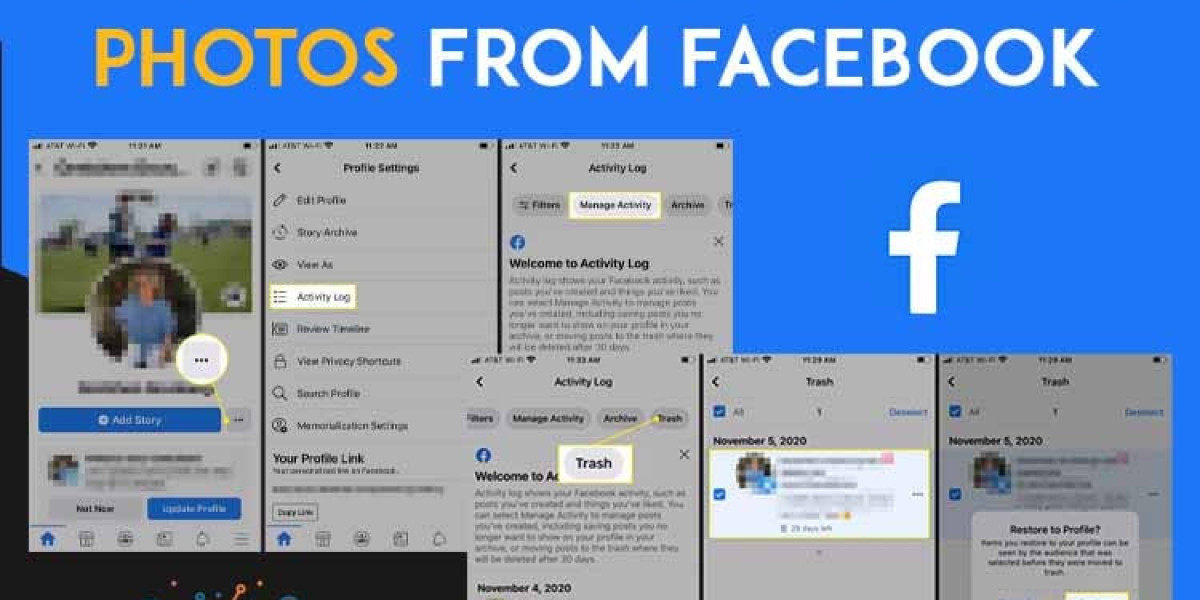

Photos shared on Facebook often hold valuable memories, whether they are personal moments, travel pictures, or important uploads. Accidentally deleting them can be frustrating, especially when you don't have a backup. If you are searching for how to recover deleted photos from Facebook , the good news is that there are a few methods you can try. While recovery is not always guaranteed, acting quickly can improve your chances.
Can Deleted Facebook Photos Be Recovered?
Before exploring solutions, it's important to understand how deletion works on Facebook. When you delete a photo, it is removed from your profile and may eventually be erased permanently from Facebook's servers. However, in some cases, Facebook keeps deleted items temporarily, allowing users to restore them within a limited time.
If your photos were deleted recently, there is a higher chance you can recover them.
Check the Recently Deleted (Trash) Folder
One of the easiest ways to recover deleted photos is by checking the Trash folder.
Steps to follow:
Open the Facebook app or website
Go to your Profile
Tap on Activity Log
Select Trash or Recently Deleted
Find your deleted photos
Click on Restore
Photos usually stay in the Trash folder for up to 30 days before being permanently removed.
Download Your Facebook Data
If your photos are no longer available in Trash, you can try downloading your account data. This method may help you recover previously uploaded content.
Steps:
Go to Settings & Privacy
Click on Settings
Select Your Facebook Information
Tap Download Your Information
Choose Photos and Videos
Request the file
Facebook will prepare a downloadable archive that may include your images.
Check Albums and Archived Content
Sometimes photos are not deleted but moved or hidden.
What you can do:
Visit your Photos section
Browse all albums carefully
Check Archived posts
You might discover that your photos are still available but not visible on your timeline.
Look for Backups on Your Device
If you uploaded photos from your phone or computer, the original files may still exist.
Check these locations:
Phone gallery
Google Photos or iCloud backup
Laptop or desktop folders
External storage devices
Many users forget that their photos are saved locally even after deleting them from Facebook.
Ask Friends or Tagged Users
If your photos included friends or were shared publicly, others might still have copies.
Try this method:
Contact friends who were tagged
Check shared posts or group uploads
Review old chats where photos were sent
This can be a quick way to recover images if someone else has saved them.
Use Browser Cache (Optional Method)
In some cases, recently viewed images may still be stored in your browser cache.
Steps:
Open your browser's search bar.
Search for the photo page
Try loading cached resources
This method works only if the image was recently accessed and not cleared from cache.
Contact Facebook Support
If your photos are very important and none of the above methods work, you can contact Facebook support.
When to contact:
Accidental message
Account hacking
Department order
Although recovery is not guaranteed, support may assist in special cases.
Tips to Prevent Photo Loss
To avoid losing your photos in the future, follow these simple tips:
Always keep a backup of important images
Use cloud storage services
Enable automatic photo sync
Avoid deleting files without checking
Regularly download your Facebook data
These steps can help you secure your memories and avoid future issues.
Final Thoughts
If you are searching for how to recover deleted photos from Facebook, there are several methods you can try, including checking the Trash folder, downloading your data, and exploring backups. While not all deleted photos can be restored, acting quickly increases your chances of success.
To stay safe, always keep backups of your important photos and manage your account carefully on Facebook. This ensures that even if something goes wrong, your valuable memories remain protected.